
Wanderburg is available on Steam for Windows. Steam’s current compatibility data rates it Playable on Deck. Playable is not the same as Verified: check the specific usability notes before choosing a handheld setup. NVIDIA also listed Wanderburg in its September 10 GeForce NOW streaming lineup. Cloud streaming is separate from a native console, mobile or Mac release.
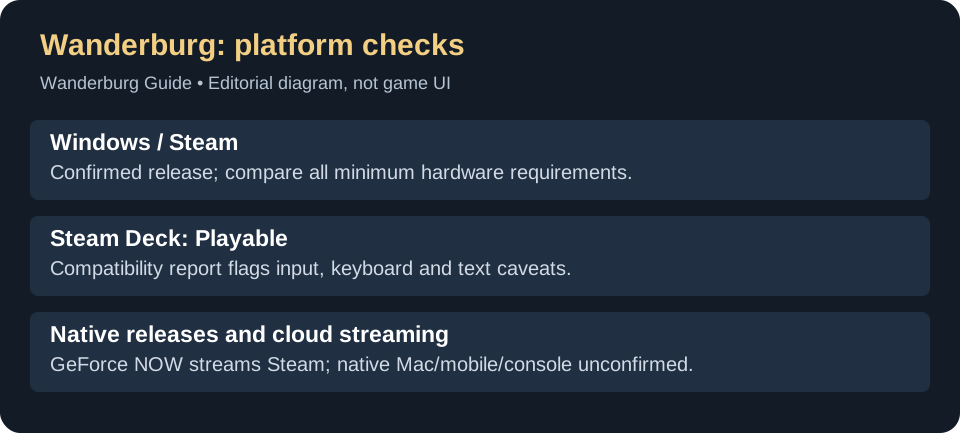
Steam Deck: what to expect from the rating
The official Steam compatibility report returns the Playable category. It flags controller-configuration limitations, text entry that may require manually opening the on-screen keyboard, and some small interface text. Plan to use touch or another input method where needed, and check readability before a long session.
This rating is a compatibility assessment, not our own frame-rate or battery test. It does not promise a particular FPS throughout an extended run. An earlier version of this guide said the rating was pending; that wording has been replaced using Steam’s current data.
Windows minimum requirements
On a small screen, swipe the table sideways to compare all columns.
| Component | Steam minimum |
|---|---|
| OS | Windows 10 or higher, 64-bit |
| CPU | Intel Core i5, 10th generation |
| RAM | 4 GB |
| Graphics | NVIDIA GeForce GTX 1660 Ti |
| DirectX | 11 |
| Storage | 2 GB available space |
Compare the full set rather than using the small storage or RAM requirement as a performance guarantee. Steam’s recommended section lists DirectX 12 but does not provide a complete higher-tier CPU/GPU target.
Is Wanderburg on GeForce NOW?
Yes: NVIDIA included Wanderburg’s Steam version in its September 10, 2026 GeForce NOW lineup. The official weekly announcement lists it among that week’s streaming games. NVIDIA notes that onboarding and availability can vary, so check the title in your GeForce NOW app before choosing a membership for it.
This is a way to stream the PC game on supported devices; it does not establish a native Mac, Android, iPhone or console edition. Check the supported store and device in the service rather than treating a Steam purchase alone as proof that every streaming setup will work.
How to play Wanderburg on a Mac
The documented route is streaming the Steam game through GeForce NOW. The sources reviewed do not confirm a native macOS edition. Installing Steam on a Mac alone does not make its Windows game build run locally.
- Check the service before buying for this purpose. Search for Wanderburg in your regional GeForce NOW catalog and confirm the Steam option. You need access to the service and the supported Steam game; a cloud membership does not itself purchase Wanderburg.
- Check your Mac and connection. NVIDIA lists macOS 10.15 or later and a Mac introduced in 2009 or later for its Mac app. Its baseline is 15 Mbps for 720p at up to 60 FPS, or 25 Mbps for 1080p at 60 FPS, with latency below 80 ms to an NVIDIA data center. These are service requirements, not measured Wanderburg performance. See the official requirements for higher resolutions and supported browsers.
- Open GeForce NOW on the Mac. Use NVIDIA’s official app/browser getting-started page and sign in. Locate Wanderburg, select the Steam version and follow the service’s launch and store sign-in prompts using the account that owns the game.
- If library discovery is the problem: NVIDIA documents Settings → Connections → Steam → Connect in its Steam sync instructions . Syncing requires the profile/game-detail visibility settings listed there; review those before changing privacy settings. Library sync is a discovery feature, not a purchase or a guarantee of regional availability.
If you cannot find the title: confirm your service region and Steam selection before paying for a membership. If it appears but the stream stutters, compare the connection with the requirements above; changing local Windows launch options is not the same troubleshooting task. This guide has not run a Mac streaming session or verified CrossOver, Whisky or other local compatibility-layer setups for Wanderburg.
PS4, PS5, Xbox, Switch and Switch 2
No native PS4, PS5, Xbox, Nintendo Switch or Switch 2 release is confirmed by the Steam listing and developer announcements reviewed for this guide. The same review does not establish a native Mac or mobile edition. The September 30 roadmap places full release in Q2 2027, but does not name a console platform. That quarter is not a PS5, Xbox or Switch release date; see the announced milestones. There is no verified console date to put in a countdown here. This is a limit of the available release information, not a claim that those editions can never happen. A Steam key grants the listed Steam product; it does not establish console or mobile ownership.
Is Wanderburg on Xbox Game Pass or PC Game Pass?
The verified release source here is the Steam product. We have not confirmed a Wanderburg Game Pass listing in the sources linked below. The NVIDIA announcement identifies its Steam version; GeForce NOW inclusion does not imply inclusion in Game Pass. If subscription access determines your purchase, check your regional Game Pass catalog for the exact title first.
Does Wanderburg have co-op or multiplayer?
The Steam release is listed as single-player. Its listed features do not include online co-op, local co-op or multiplayer. Steam Cloud refers to the store feature, and GeForce NOW refers to streaming; neither establishes a co-op mode. Do not buy it expecting a shared run with another player on the basis of those labels.
Controller support
Handling changed after the October 22 update? Hotfix 0.9.15 sets Alternate Controller Layout to Off and applies a one-time reset. Use the setting check and short steering comparison before changing hardware or buying a movement upgrade. The official notes also list start/options navigation fixes; they do not announce new console support or remove the Deck usability caveats.
The official Steam description supports mouse, keyboard and controller play. This does not override the Deck report’s input and text-entry caveats, or guarantee that every controller configuration works without an issue.
If controller and keyboard icons keep switching, a September 30–October 4 controller discussion describes that symptom, with one reply using a wired Xbox 360 controller. The thread does not establish a fix. Report your controller model, connection type and the input that triggers the switch; a controller-support label is not evidence that this particular problem has been solved.
Controls and getting started
If the Windows game closes unexpectedly, use the DX12 and Vulkan crash checks before treating it as a platform-availability problem.
The official description supports mouse, keyboard and controller. For the alternative controller driving option, Nitro recovery delay and current stats shortcut, see the first-run guide. For the retired demo and current release status, see Early Access.
The Steam Deck compatibility report supplies the rating and input caveats; Valve’s rating explanation distinguishes Playable from Verified. Windows requirements and supported input methods are from the Steam listing linked above.
Latest official update signal
Titles and dates are synchronized automatically; this does not re-verify the guide. See the Updates & Hotfixes index for the source list. Latest source date detected: .
- 0.9.15 — Hotfix 0.9.15 is live! — published 2026-10-22.
- Our Early Access Roadmap is here! — published 2026-09-30.
- 0.9.14 — Hotfix 0.9.14 is live! — published 2026-09-21.